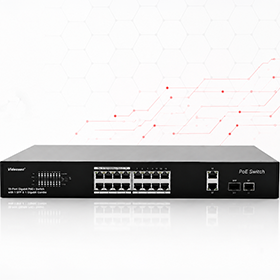
PoE Switches – Installer Guide
A comprehensive practical guide to selecting PoE switches and accessories, designing network topologies, and using Cloud Managed features in Videosec systems.
Which PoE solution suits your project?
PoE (Power over Ethernet) means the IP camera gets its power over the same network cable that carries its video, so one UTP cable per camera is enough. The Videosec PoE range has three groups:
- Unmanaged PoE switches
- 4, 8, 16 and 24 PoE ports, with no configuration needed.
- Cloud Managed PoE switches
- 8, 16 and 24 PoE ports, managed from the cloud.
- PoE accessories
- PD switch, PoE injector, PoE extender, surge protection.
Below we go through each group, the typical network topologies and the power supply options, and a table at the end covers the most common installation situations. You can also download the original illustrated version as a PDF.
Unmanaged PoE switches
An unmanaged PoE switch is a simple, reliable and cost-effective option for IP camera systems: plug it in and it works, with no configuration needed. The cameras get PoE power over a single UTP cable, operation is stable, and the price/value ratio is competitive. We recommend them for family homes, small businesses, offices, warehouses and systems with 4–24 cameras.
- Gigabit uplink
- High-bandwidth connection for stable network performance.
- SFP uplink
- Optical connection for greater distance and reliability.
| PoE ports | Models in our range |
|---|---|
| 4 PoE ports | PS04FE+2FE-V3, PS04GE+1GE+1SFP |
| 8 PoE ports | PS08FE+2FE-V2, PS08GE+2GE+2SFP |
| 16 PoE ports | PS16FE+2GE, PS16FE+2GE-V1, PS16FE+2GE+1SFP |
| 24 PoE ports | PS24FE+2GE+2SFP, PS24GE+2GE+2SFP-AI |
Pro tip:choose an unmanaged PoE switch if you need a simple, quick-to-install and reliable camera system that does not require network configuration.
Cloud Managed PoE switches
Cloud Managed switches can be monitored from anywhere over an internet connection, and they also offer intelligent network functions (covered below). The range has four models:
| Model | PoE ports | Uplink | PoE budget | Recommended for |
|---|---|---|---|---|
| PSNSW3000-8FE+2GE-CM | 8 × 10/100 Mbps PoE | 2 × gigabit | 120W | small systems with up to 8 cameras |
| PSNSW3000-17GT1GP1GC-LPOE-IN | 16 × gigabit PoE | gigabit and SFP | 150W | medium-sized and rack-mounted systems |
| NSW3000-24T1GT1GC-POE-IN | 24 × 10/100 Mbps PoE | gigabit + GE/SFP combo | 370W | larger camera systems and higher PoE requirements |
| PSNSW3000-24T1GT1GC-POE-IN | 24 × 10/100 Mbps PoE | gigabit + GE/SFP combo | 370W | 24-port Cloud Managed model |
Pro tip:when choosing a switch, look at the uplink connection and the total PoE budget as well as the number of ports. The consumption of all the cameras has to fit within the budget. It is also worth leaving one or two ports free, because they come in handy when the system is expanded later.
Network topologies
Choosing the right network topology is just as important as choosing the right switch. The type of cable network (UTP or fibre) and the installation environment determine the best solution.
Point-to-point system
16 or 24 port PoE switch
UTP
cameras
Every camera runs directly to one central switch. Recommended: a 16 or 24 PoE port switch, rack-mounted, in a central location.
Short cable distance (UTP backbone)
PoE switch
UTP
PoE switch
UTP
PoE switch
Several smaller switches linked with UTP cable, each serving the cameras near it. Recommended: 4 or 8 PoE port switches with two uplink ports and a gigabit uplink, on a copper cable network.
Long cable distance (SFP backbone)
PoE switch
SFP
PoE switch
When the switches are far apart, connect them with optical fibre through the SFP uplink. Recommended: an SFP uplink, which covers long distances and is immune to electromagnetic interference.
Remote switches and network extension
Multiple point-to-point systems with optical connections
16 or 24 port switch
SFP
16 or 24 port switch
For connecting several buildings and covering long distances. Recommended: 16 or 24 port switches linked to each other through SFP uplinks with optical fibre.
Remote switch without 230V power
PoE switch
UTP cable
PD switch
UTP
cameras
If there is no local 230V power supply at the remote point, use a PD switch. The PD switch works without its own power supply: it gets power from the PoE switch over a UTP cable and passes it on to the cameras connected to it, which keeps remote installation simple. In our range, the 3 PoE port PS03FE+1PD-DIN and the 4 PoE port PS04PGE+1PD are PD switches.
Important: a PD switch can only be powered from a PoE port that supplies at least 30W. If more power is needed, use a High-PoE injector.
Pro tip:if there is no local 230V power supply, a PD switch is an easy way to add a new PoE endpoint. Always check that the supplying PoE port has enough power for proper operation.
PoE power supply solutions
With the right PoE accessory, an existing network can be expanded without major modifications. Four typical situations:
High power PoE
LAN or PoE switch
UTP
PoE injector (60W)
UTP + PoE
PTZ camera
For high power requirements, PTZ cameras and high-consumption devices (High-PoE). In our range: RA-48PoE-60G.
Adding PoE to an existing network
LAN switch
UTP
PoE injector (30W)
UTP + PoE
IP camera
When there is no PoE switch and you want to add a single camera to the existing network quickly. In our range: RA-48PoE-30G.
Using a non-PoE camera
PoE switch
UTP + PoE
PoE splitter
data + 12V
non-PoE camera
The splitter separates the PoE connection into data and 12V power, so a non-PoE camera also works on a PoE network. In our range: PoE-48, and the waterproof PoE-48W for outdoor use.
Injector and PD switch
LAN or PoE switch
UTP
PoE injector
UTP
PD switch
UTP
4 cameras
For remote installations where you need up to 4 cameras at one point but have no local 230V. Installation is simple.
Pro tip:before installation, always check the device's power requirement, the voltage it needs and the available PoE power.
Cloud Managed switches: central management
Videosec Cloud Managed PoE switches can be managed from a web interface and from the Videosec Control Panel Pro mobile app, from anywhere over an internet connection.
- Web interface
- Real-time port status, connected devices per port (type, IP address, name), IP and device information, CPU and memory usage, remote configuration.
- Mobile app
- Port status, PoE power usage per port, upload and download speed, traffic per port, remote port restart.
Intelligent network functions
- VLAN
- Secure network segmentation and logical separation of networks, for example a separate camera and office network.
- QoS
- Ensures bandwidth for critical traffic such as video.
- Port Isolation
- Isolates the devices on the ports from each other.
- PoE Watchdog
- Automatically restarts PoE devices that stop responding.
- PoE Schedule
- Switches PoE ports on and off on a schedule.
- Loop Protection
- Automatic protection against network loops.
Quick guide for installers
The most common situations and the recommended Videosec solution:
| Situation | Recommended solution |
|---|---|
| Camera keeps crashing | PoE Watchdog: automatically restarts unresponsive PoE devices |
| No local 230V | PD switch: powers up to 4 cameras over a single PoE connection |
| Long distance | SFP uplink: optical connection |
| High power PTZ camera | 60W PoE |
| Cameras must be separated | VLAN |
| Video traffic congestion | QoS: video traffic gets priority |
| Network loops occurred | Loop Protection |
| Remote troubleshooting is needed | Videosec Control Panel Pro: port status, PoE power usage and remote port restart from the web or the mobile app |
It is worth connecting, setting up and testing the switch and the cameras before installation. That way, all that is left on site is the mounting. If you have a question, email us before the installation, so we can answer in time.
Recommended PoE switches and accessories

PSNSW3000-8FE+2GE-CM
8 PoE port Cloud Managed switch with 2 gigabit uplinks and a 120W PoE budget, for up to 8 cameras.
View product
PSNSW3000-17GT1GP1GC-LPOE-IN
16 gigabit PoE ports, gigabit and SFP uplinks, 150W PoE budget, managed from the cloud.
View product
PS03FE+1PD-DIN
DIN rail PD switch with 3 PoE ports, powered from a PoE+ (30W) or High-PoE (60W) port, with no local 230V needed.
View product
RA-48PoE-60G
60W PoE injector powered from 230V, for high-consumption devices such as PTZ cameras.
View productYou will find the full range under PoE switches. If you are not sure which solution suits your system, write to us and we will help you put it together.
Related categories