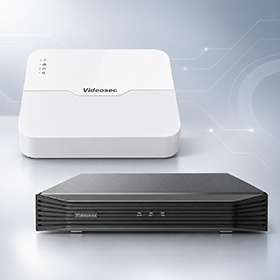
XVR or NVR? Which video recorder should you choose?
Hybrid XVR or network NVR? The answer depends on the cameras in the system and what it is for. I explain when I recommend each one, and what to look for when choosing a recorder.
What is the difference between an XVR and an NVR?
An NVR (network video recorder) records the image from IP cameras, which send a digital picture over the network cable. An XVR (hybrid video recorder) takes analogue HD cameras over coaxial cable, but can also handle a few IP cameras alongside them. Which one you need depends on the cameras in the system and what the system is for.
When people ask me, I answer with a question: do you need to expand an existing analogue system with new IP cameras? Then I recommend the hybrid XVR. Are you building a completely new, future-proof and up-to-date camera system? Then an NVR and IP cameras. Is the budget small, but you still need to cover the area with a few solid analogue HD cameras? XVR. For everything else, projects, expandable systems and smart features, there is the NVR.
When should you choose an XVR?
An XVR is a good choice if you already have an analogue camera system and coaxial cabling, or if the budget is tight. The advantage of an analogue system is that it costs an order of magnitude less, and the existing cabling can stay.
The Videosec XVR-301-08Q+4, for example, takes 8 analogue and 4 IP cameras, with AHD, TVI, CVI and CVBS signals on the analogue inputs and camera resolutions up to 8MP. That way an old analogue system can keep running while IP cameras are added step by step. For a larger system, the XVR-301-16Q+8 handles 16 analogue and 8 IP channels.
When should you choose an NVR?
For a new system, I almost always recommend an NVR with IP cameras. The balance tips towards IP if you need a colour image at night, human detection and smart (IQ) features, resolution above 5MP, or a varifocal lens. The most important argument is that the IP camera signal is noise-free, while an analogue camera image will always have a little noise.
PoE NVR: one cable per camera
NVRs with a built-in PoE switch also power the cameras over the network cable, so one cable per camera is enough. The Videosec NVR-301-04LH-P4 has 4 PoE ports with up to 30W per port and 54W of PoE power in total, for small systems, and the NVR-301-08LH-P8 has 8 PoE ports. Both record cameras up to 8MP with H.265 compression.
Larger systems and smart features
If you need more cameras or the analytics features matter, it is worth choosing a bigger recorder with a separate PoE switch. The NVR-501-16IQ2 has 16 channels, records cameras up to 16MP, and also offers intrusion, line crossing, audio and face detection.
Recommended recorders

XVR-301-08Q+4
Hybrid recorder for 8 analogue and 4 IP cameras, with AHD, TVI, CVI and CVBS inputs, up to 8MP.
View product
NVR-301-04LH-P4
4-channel NVR with a built-in PoE switch and 54W of PoE power in total, for cameras up to 8MP.
View product
NVR-301-08LH-P8
8-channel NVR with 8 PoE ports and H.265 compression, for cameras up to 8MP. With 5-6 cameras, there is still spare capacity.
View product
NVR-501-16IQ2
16-channel NVR for cameras up to 16MP, with intrusion, line crossing, audio and face detection.
View productWhat should you look for when choosing a recorder?
Once you have decided between an XVR and an NVR, these are the points worth checking on the datasheet:
- Channel count: how many cameras the recorder takes; for an XVR, the number of analogue and IP channels separately.
- Camera resolution: the highest camera resolution it can record and play back. The recorder has to handle the highest-resolution camera you plan to put in the system.
- Hard drive: how many hard drives fit inside. The models above have one SATA bay, and the recording time depends on the drive size, the number and resolution of the cameras, and the compression.
- PoE power: with a PoE NVR, it is not only the number of ports that counts but the total PoE budget too, because the consumption of all the cameras has to fit within it.
- Remote access: you can view the cameras from your phone with our own app, Videosec Control Panel.
One more thing: it is worth connecting, setting up and testing the recorder and the cameras on the desk before installation. That way, all that is left on site is the mounting, and you will not find out at the top of a ladder that a setting was missed.
Always leave spare capacity
There is one piece of advice I give for every system: leave spare capacity. One or two extra channels on the recorder or the PoE switch always come in handy when you need to expand later. If you are planning 4 cameras now but can see that you may need 5-6 over time, choose the 8-channel recorder instead. Expanding then means just a new camera, not a new recorder.
It is also worth taking time over choosing the model, because the range is wide and the installation conditions matter a lot. You will find the full range under NVRs and XVRs.
In short: which one should you choose?
- Expanding an existing analogue system: hybrid XVR.
- Small budget, a few analogue HD cameras: XVR.
- A new, future-proof system: NVR and IP cameras.
- Projects, expandable systems, smart features: NVR.
If you are not sure which recorder suits your system, write to us and we will help you put it together.
Related categories
Frequently asked questions
Can I connect IP cameras to an XVR?
Yes, a limited number. The Videosec XVR-301-08Q+4, for example, takes 4 IP cameras alongside 8 analogue ones, and the XVR-301-16Q+8 takes 8 IP cameras alongside 16 analogue ones.
Which analogue cameras does the XVR accept?
Videosec XVR recorders accept analogue cameras with AHD, TVI, CVI and CVBS signals, up to 8MP resolution.
Do I need a separate PoE switch for the NVR?
Not with an NVR that has a built-in PoE switch. The NVR-301-04LH-P4 powers the cameras on 4 PoE ports and the NVR-301-08LH-P8 on 8. An NVR without PoE, such as the NVR-501-16IQ2, needs a separate PoE switch.
How many days does the recorder record?
That depends on the hard drive size, the number and resolution of the cameras, and the compression. H.265 compression uses less storage than H.264 at the same image quality, so a longer recording fits on the same drive.
Can I view the cameras on my phone?
Yes, with the Videosec Control Panel mobile app you can view the cameras remotely.
How many channels should my recorder have?
Always keep one or two channels spare. If you are planning 4 cameras now but may need more later, with an 8-channel recorder expanding means just a new camera, not a new recorder.